 PrintSheriff
Catch 3D print spaghetti before it wastes a spool.
PrintSheriff uses machine learning to detect spaghetti from webcam images, with free local inference on your Raspberry Pi or OctoPrint host — no cloud subscription required.
The OctoPrint plugin is completely free and open source — no account, no subscription, no usage limit.
Watch a failure get caught
A webcam pointed at the bed is all it needs. Every frame gets a failure score.
Try the live demo → OctoPrint plugin
✓ Free
OctoPrint plugin
✓ Free
Sits in the panel you already use
Status and probability show up next to the webcam feed. Alerts require several failed frames within a recent window to reduce false alarms from a nozzle crossing the shot.
 Push alerts go out through ntfy, so you hear about a failed print
wherever you are — with the offending frame attached.
Push alerts go out through ntfy, so you hear about a failed print
wherever you are — with the offending frame attached.


See why it decided
A heatmap shows which pixels drove the score — handy for checking a false alarm. The model should light up the print, not the wall behind it.
Attention gallery →

What sets it apart
Most hosted print-monitoring services stream your webcam frames to their servers and meter how many hours they watch. PrintSheriff is built the other way round.
Runs on the printer host
Inference is local TFLite on your Raspberry Pi. Frames never leave your network, detection keeps working when your internet is down, and there is no per-hour quota.
Small enough for a Pi Zero
A MobileNet backbone scores a frame in ~40 ms on a Pi 5 and ~480 ms on a Pi Zero 2 W — no GPU, no separate box, no noticeable load during a print.
Trained on messy real data
Tens of thousands of crowdsourced frames across many printers, camera angles, filament colours and lighting conditions — not one tidy rig in one room.
Free and inspectable
The plugin is open source with no account or subscription, and every prediction can return a heatmap so you can check what the model actually looked at.
Need it without a Pi? The same model is available as a hosted HTTP endpoint — see the API page. Full pipeline and ROC numbers are on the technical details page.
Free local AI detection for 3D printer spaghetti
A spaghetti failure happens when extruded filament forms loose strands instead of the intended part. PrintSheriff is a webcam-based 3D printer failure detector.
How the detector decides
A MobileNet machine learning model scores the image, and the OctoPrint plugin checks recent scores before raising an alert. One camera image is enough to start.
See the local ML detection pipeline or test spaghetti detection with your own print photo.
Try the live demo →Looking for an Obico alternative?
If you are researching Obico or The Spaghetti Detective and want free local inference, PrintSheriff offers an open-source OctoPrint plugin focused on failure detection. PrintSheriff is an independent project, not affiliated with Obico.
Read the Obico alternative guide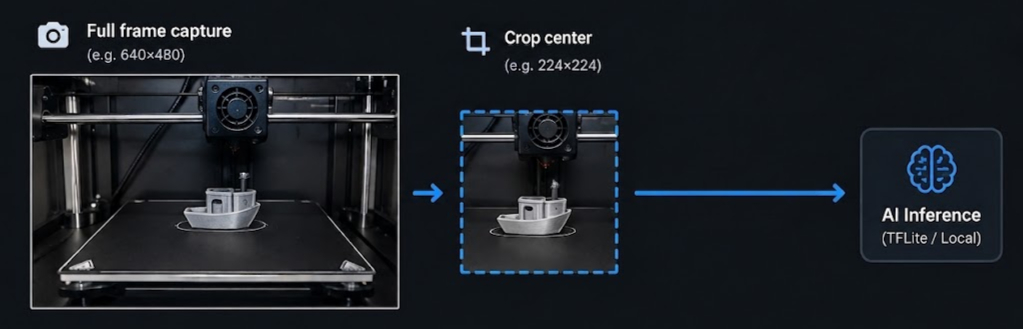
3D print failure detection: common questions
Is PrintSheriff free, or is local inference limited?
The OctoPrint plugin is free and open source, with no account, subscription, or inference-hour limit. Your printer host runs the model. The optional hosted API is a separate service with its own RapidAPI plans.
Does spaghetti detection work without internet?
Local detection works offline once the plugin, runtime, and model are installed. Model downloads and updates need a connection to the configured model server; remote ntfy notifications need a connection to your ntfy server. Camera uploads for model improvement are optional and disabled by default.
Does AI detect every kind of 3D print failure?
No. PrintSheriff focuses on visible spaghetti failures, not every printing defect. Camera angle, lighting, and the centre crop affect results, and false alarms or missed failures are possible. Keep normal printer safety precautions in place. Start with the OctoPrint failure detection setup guide.
Upload a photo or use your webcam.
Open → APIOne POST, one score.
Docs → PluginLocal inference on the Pi.
Install → ContactFalse alarm or missed fail?
Write →Give every 3D printer a pair of eyes.
Run it on OctoPrint, or just call the API.